
Presets and Settings
Presets and Settings help players organize loadouts, filters, notifications and comfort options for farming, PvP and progression.

NovaRaiderTeam
· Presets and Settings
What Presets and Settings Are
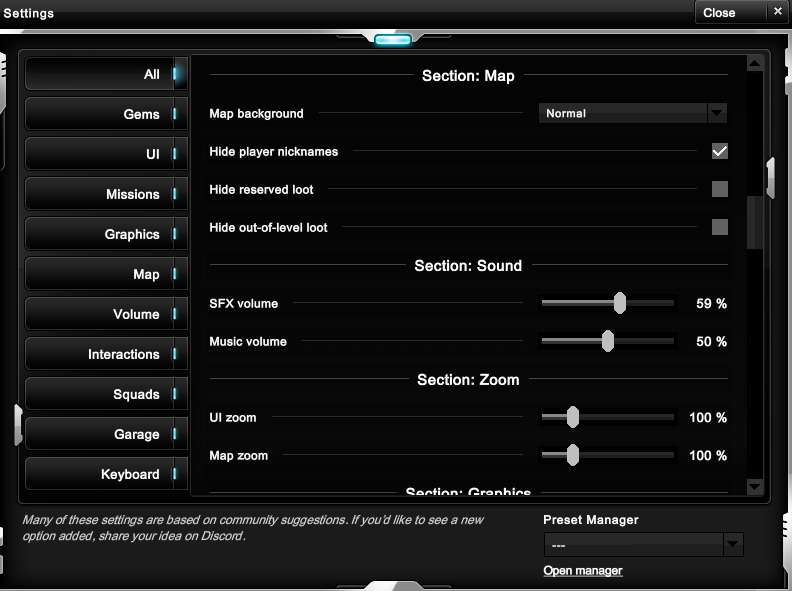
Presets and Settings help you make Nova Raider easier to play. Settings change how the game displays information, handles notifications and filters interactions. Presets let you prepare repeatable setups for the Garage, Gems and general play.
A good setup makes combat and farming smoother. It does not increase stats by itself, but it helps you use Weapons, Shields, Gems, Squadrons, Quests and PvP tools more reliably.
Main Setting Areas
| Category | What it usually controls | Examples | Why it matters |
|---|---|---|---|
| Ui | Interface display and information density. | Show nearby, screen panels, target feedback. | Keeps important information visible without clutter. |
| Map | Map display and collection filters. | Loot visibility, player names, collector filters. | Helps farming routes and reduces distractions. |
| Graphics | Visual presentation and performance options. | Map visuals and display choices. | Useful for smoother sessions on weaker devices. |
| Sound | Volume and audio feedback. | Sound effects and music volume. | Helps hear feedback without overwhelming the session. |
| Keyboard | Keyboard shortcuts and action comfort. | Keybind-related options. | Improves reaction time in PvP and PvE. |
| Missions | Mission display and objective tracking. | Mission notification and task visibility. | Keeps Flash Missions and season goals easier to follow. |
| Interactions | Invitations and social notifications. | Group invitations, arena notifications. | Reduces missed group or PvP opportunities. |
| Squads | Squadron and collection automation options. | Squadron filters and auto-sell behavior. | Useful once Squadrons and loot management matter. |
| Garage | Garage and renamed helper settings. | Drone, turret and collector naming. | Keeps your gear setup easier to read. |
Preset Manager
| Preset area | What it is for | Good use |
|---|---|---|
| Garage | Save equipment and gear configurations. | Switch between farming, PvP, boss and support setups. |
| Gems | Prepare gem layouts for different builds. | Move between Damage, Health, Stock, XP or PvP setups. |
| Settings | Keep comfort and display preferences organized. | Use different layouts for combat, farming or low-distraction play. |
Practical Advice
Create presets around real activities, not random item lists. A PvP preset should consider Shields, Ammunition, Cooldowns and Damage. A farming preset should consider Stock, Propulsion, resource filters and any active Kits.
Preset Limits and What They Apply
The account can store up to twelve ship/equipment presets, twelve Gem presets and four Settings presets. Preset names are limited to 25 characters and each preset can have an optional keybind.
A ship preset records the selected ship and skin plus up to three Weapons and three Shields. It is applied through the Garage rules: the player must be at the Garage, alive, outside the recent-PvP lock and able to meet every level, research and currency requirement. Owned entries are equipped directly. Missing ship, skin, weapon or equipment entries may be purchased at their normal Uranium or Star price when all requirements are met.
A Gem preset is stricter: it can only equip gems already owned in currently unlocked positions and never purchases missing gems. A Settings preset validates and normalizes every saved option before applying it, so an obsolete or invalid value does not bypass the current settings rules.
| Preset family | Stored content | Can purchase missing content? |
|---|---|---|
| Ship and equipment | Ship, skin, up to 3 weapons and 3 equipment items | Yes, through normal Garage prices and requirements. |
| Gems | Owned gems and their slot positions | No. |
| Settings | Supported game options | No. |
Presets accelerate legal actions; they do not bypass costs, map location, combat locks, research requirements or inventory ownership.
FAQ
Do presets buy items for me?
Garage presets can equip owned items and may purchase missing ship, skin, weapon or equipment entries when you are at the Garage and meet every level, research and currency requirement. Gem and Settings presets do not purchase content.
Should every activity have its own preset?
Only if you switch often. Start with one farming setup and one combat setup, then add more when needed.
Can settings improve performance?
Display and graphics choices can make the game easier to read and smoother to play, even if they do not change stats.