
Guild HQ Buildings Update Is Now Available
Nova Raider introduces Guild HQ buildings, allowing guilds to build, upgrade, defend their Hypercore, and unlock new strategic bonuses.

NovaRaiderTeam
🏗️ Guild HQ Buildings Update
Hello everyone,
The new Guild HQ update is now available in Nova Raider.
This update introduces the ability to construct buildings directly inside your Guild HQ, bringing new strategic options for guild progression, defense, and raids.
🏰 Build and Defend Your HQ
Guilds can now build and organize their headquarters around a central Hypercore.
The Hypercore stores the points earned through guild activity and becomes the main structure to protect during enemy invasions.
Guilds can also place support, bonus, and defensive buildings to strengthen their HQ and protect their progression.
⚙️ HQ Building Roles
To manage HQ buildings, guild members need the correct permissions:
- -Edit role: required to create, move, upgrade, and delete buildings
- -Repair role: required to repair buildings
💠 Building Types
A guild can build several types of structures:
- -Hypercore, the central building of the HQ
- -Inhibitors, which heal your ship and your HQ
- -Bonus buildings for Attack, Life, CPU, and Stock
- -Defensive buildings to protect your Hypercore and bonuses
For this first part of the update, guilds can build two bonus buildings per category, for a total of eight bonus buildings.
More bonuses will be added in future updates.
💰 Reserves and Stolen Points
Building, upgrading, and unlocking HQ locations may require Uranium and Stolen Points.
Uranium can be donated through the guild page to support HQ construction.
Stolen Points are spendable and cannot be stolen by enemy guilds.
Ranking Points remain linked to rankings and can be stolen by opposing guilds.
For every Ranking Point earned, one Stolen Point is also added to your balance.
🛠️ How to Build Your First Buildings
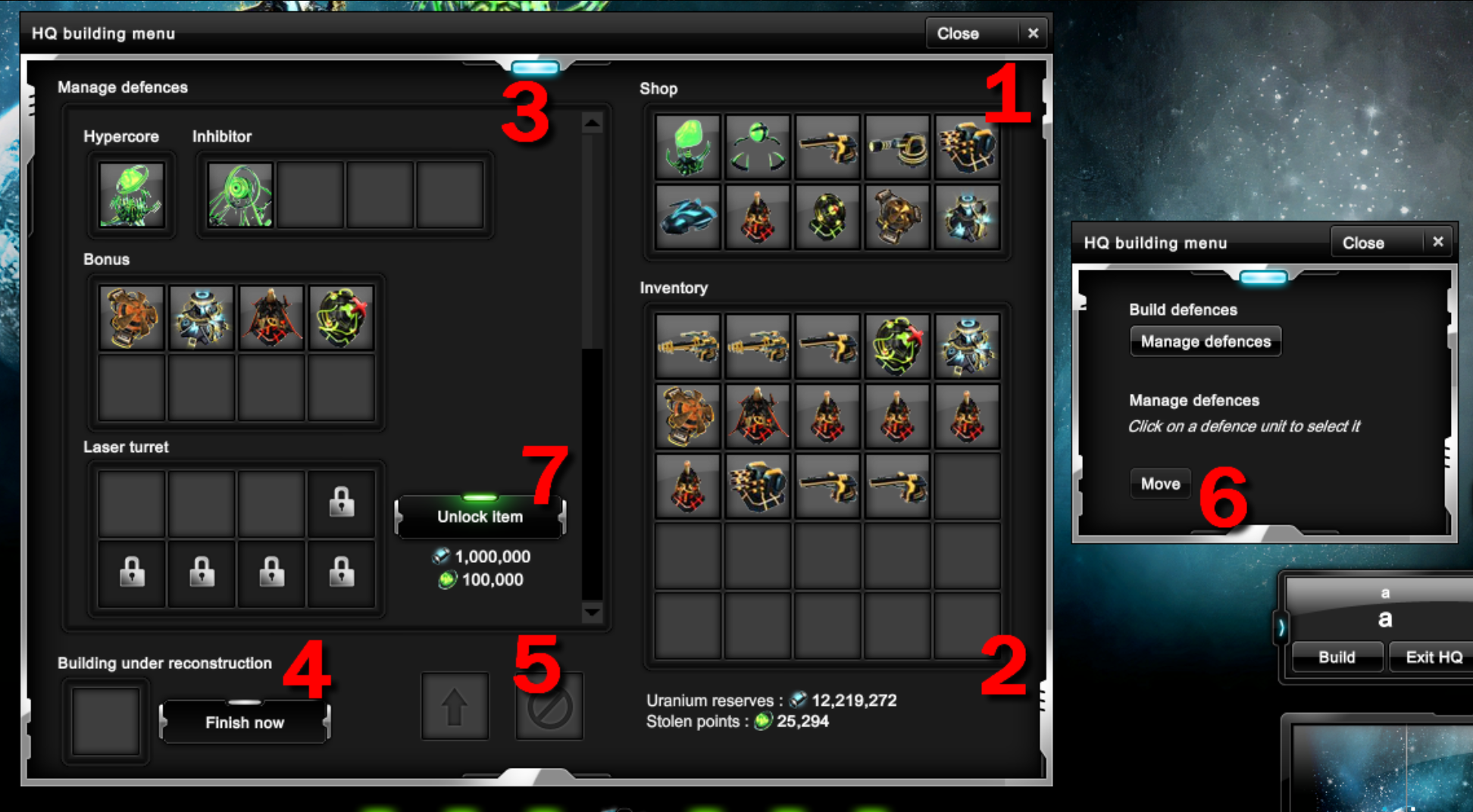
To begin, a guild must first purchase and equip a Hypercore before placing any other building.
In the HQ building menu:
- -Use the Shop (1) to buy new HQ buildings.
- -Purchased buildings can be placed in the Inventory (2) if you want to equip them later.
- -Drag buildings into the available HQ slots (3) to place them.
- -When placing a building, valid locations are highlighted to guide you.
- -Once equipped, the building enters a construction phase.
⏳ Construction, Movement and Unlocks
When construction starts, or when a building is destroyed or upgraded, a cooldown appears in the building section (4).
You can speed up construction with spare Uranium, but this is optional.
The menu also allows you to manage your HQ layout:
- -Use the action buttons (5) to manage selected buildings.
- -Use Move (6) to reposition a selected defense unit.
- -Use Unlock Item (7) to unlock additional building slots when available.
⚔️ A New Step for Guild Gameplay
This update adds a new strategic layer to guild progression.
Build your HQ, protect your Hypercore, strengthen your members with bonuses, and prepare for future guild battles.
— The Nova Raider Team